

Congratulations! You’ve finally decided to resign from your job and go full time into your profession. Whether you’re going to become a freelancer, a licensed professional, or a small business owner, you’re now your own boss! Now to make sure that things are on the up and up, the first thing you’ll have to do is transfer your RDO – from the RDO of your employer to YOUR RDO. Fortunately, the process is easy and quite painless by using the BIR Form 1905.
Not sure how to transfer your RDO? Get it done quick and easy through Taxumo!
Steps In Transfering Your RDO
Step 1
Find out in which RDO your TIN is now. Most likely, your employer moved your TIN to their RDO. To confirm, you can call the BIR Contact Center at 981-7003, 981-7020, 981-7040, or 981-7046. If they can’t help you, you may have to go to the RDO and inquire. It’s fairly quick though and they can look up in which RDO your TIN is in.
Step 2
Fill out BIR Form 1905. You can get a copy here but we do recommend that you check the BIR website to see if there’s an updated copy. Here’s what you place in the fields:
Part I: Taxpayer Information
Make sure you fill out the following fields: Taxpayer Identification Number (TIN), RDO Code, Contact Number, and your Registered Name.
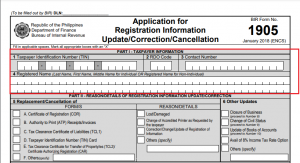
Part II
Change In Registered Address
Find Section 7 entitled “Correction/Change/Update of Registration Information”. You’ll be ticking Field 7B or “Change in Registered Address”
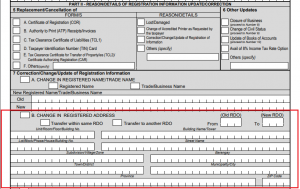
Chances are, you’re moving to another RDO. If you are, tick the box that says “Transfer of Home RDO,” then place the From RDO and the To RDO (the RDO of your new address). After that, write your new address (most likely your home address if you’re a home-based freelancer), your zip code, and your telephone number.
If you are transferring within the same RDO but a different address, then tick the box that says “Transfer within Same RDO”. Write your address, zip code, and telephone number.
Sign the Declaration
Write your name and sign. For the title, you may place your official title or just “Taxpayer”

Step 3
Bring the BIR Form 1905 to your OLD RDO. In around 1 week, processing should be done and your TIN should now be registered in your new RDO.
This is just the first step in legitimizing your new business. After this, you’ll fill out your Form 1901, get some books stamped, and finally get your Certificate of Registration (COR).
And after getting your COR, you can start filing taxes such as your annual income tax returns.
Do you want us to help you with your business registration?
Did you know that we can help you register your business…so that you have more time running and growing your business? Check out our Business Registration, click the button below