
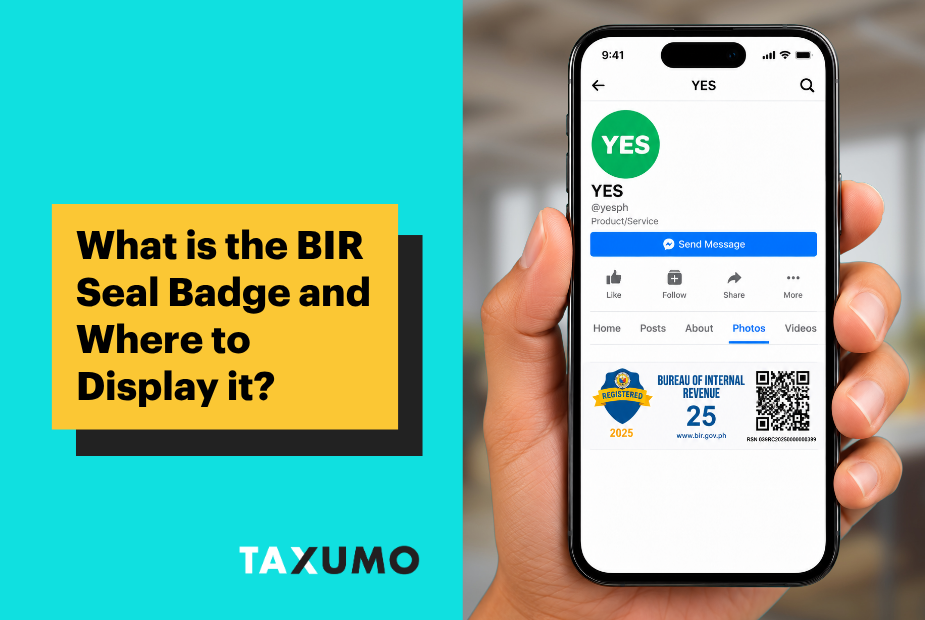
BIR requires covered online sellers, service providers, and digital businesses to show proof that they are registered. For online pages, that proof is the BIR Registration Seal Badge.
Revenue Memorandum Circular No. 99-2026 gives businesses until October 31, 2026 to post the badge.
💡 If you’re an online seller, you may need to show a BIR seal badge on your website, shop, or business page. Covered businesses have until October 31, 2026 to display it without penalties caused only by non-display.
What is BIR seal badge
The BIR Registration Seal Badge is a small digital badge that shows an online business is registered with the BIR. It is meant for websites, online shops, mobile apps, social media business pages, and seller profiles. It lets a business show proof of registration without posting its full Certificate of Registration online.
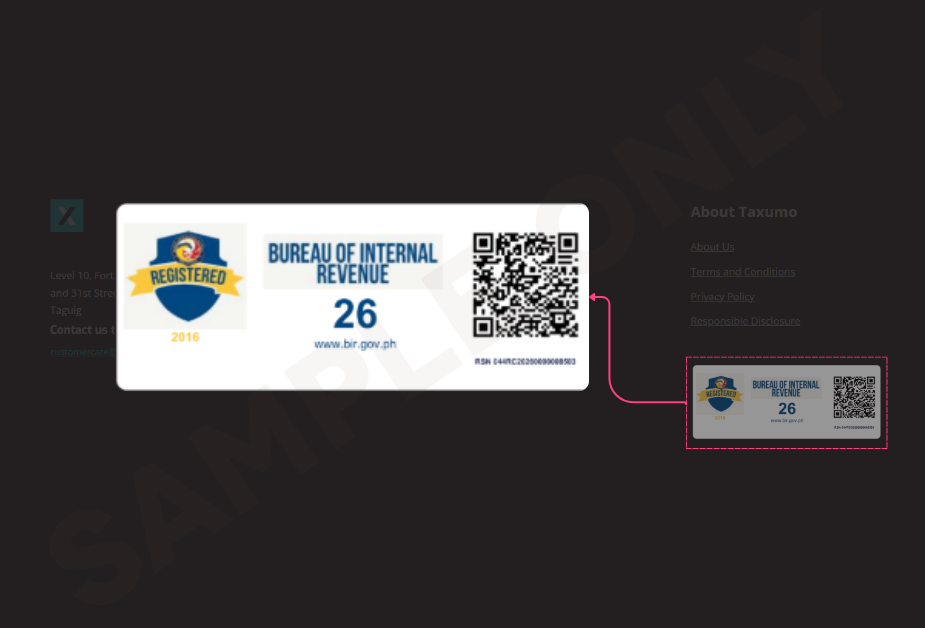
For reference only. Use the badge issued for your own BIR registration. Do not copy or reuse this sample.
Its online version is called an electronic Certificate of Registration, or eCOR. These documents may contain information that a business should not need to publish in full. The badge gives customers a simpler way to check the registration. Its QR code opens a BIR verification page when scanned.
The badge only shows that the business has a BIR registration. It is not a BIR endorsement, and it does not prove that every tax requirement has been completed.
Should I display the BIR seal badge?
The rule covers online sellers, online merchants, digital platform operators, and other people or businesses that sell goods or services online. It can apply whether sales happen through a website, an app, a marketplace, or a social media page.
It is not limited to people who sell products. RMC No. 38-2026 also names professionals, bloggers, vloggers, live streamers, content creators, influencers, and people who earn from online views, advertisements, affiliate commissions, brand sponsorships, or similar digital activities.
Where should the badge appear
Customers should be able to find the badge easily. The BIR gives these examples:
- Your website or app. Put it on a page such as About, Company, Government Compliance, or Business Permits.
- An e-commerce platform or app. Put it in Support, About, Settings, Government Compliance, or Business Permits.
- Your seller or service-provider account. Put it on your profile, store details, shop page, marketplace page, or business page.
Do not hide the badge in an old post or a hard-to-find photo folder. It should be easy for a customer to open and view.
How to post it correctly
You only need to post the badge image. You do not need to post the full COR or eCOR. Follow these steps:
- Crop, scan, or save only the badge portion of the document.
- Keep the badge clear and readable. Do not change its wording, QR code, colors, or other design details.
- Do not upload the full COR or eCOR just to meet the online display rule.
- Scan the QR code after posting to make sure it still works.
- Check that the scan opens the official BIR address: https://verify.bir.gov.ph/correspondence/
How to get the badge
- Where to get the badge: Apply online through the BIR’s Online Registration and Update System (ORUS). You may need to update your business details first.
- Is it free? Yes, the badge is free! However, you need to pay ₱30 for Documentary Stamp Tax when applying through ORUS.
- Do you need to update your COR or eCOR? Not necessarily. You don’t need to replace your existing certificate just because it has no QR code. However, if your business is required to display the badge, you still need to get one.
- Before applying: Make sure your registered business activities are correct and up to date with the BIR.
- Not sure about your business category? The BIR has specific categories for online sellers, content creators, online tutors, and other online businesses. If you’re unsure where your business belongs, ask your Revenue District Office (RDO) for help.
What the October 31 deadline means
Businesses that have not posted the badge have until October 31, 2026 to do so without penalties caused only by non-display.
This limited relief does not cover other problems. It does not excuse an unregistered business, wrong registration details, unpaid taxes, or other missed duties. RMC No. 99-2026 also does not state the exact penalty for failing to display the badge after October 31. The safest step is to complete the process before the deadline.
Simple compliance checklist
1. Check if the rule covers you. List every website, shop, app, marketplace account, and social media page you use for business.
2. Check your BIR details. Make sure your registered business activity matches what you actually do online.
3. Get your badge. Contact your RDO or use ORUS. Update your registration details if needed.
4. Post it where customers can find it. Use your profile, shop details, About, Support, Government Compliance, or Business Permits page.
5. Do not alter it. Post only the badge image. Keep it readable and do not expose your full COR or eCOR online.
6. Test and keep proof. Scan the QR code, check the official BIR address, and save a dated screenshot showing where you posted the badge.
Need help with tax filing and eInvoice requirements for your online business? See how Taxumo can support online sellers.


Frequently Asked Questions
What is a BIR seal badge?
The BIR Registration Seal Badge is a digital badge with a QR code that shows your online business is registered with the BIR. You can display it online instead of posting your full Certificate of Registration (COR).
Who needs to display the BIR seal badge?
If you sell products, offer services, or earn money online, you may be required to display the badge. This includes:
- Online sellers and shop owners
- Freelancers and online service providers
- Content creators, influencers, and vloggers
- Online tutors and educators
- Businesses earning from ads, sponsorships, or affiliate links
- Online marketplaces and digital platforms
Where should I display my BIR seal badge?
Place your badge somewhere customers can easily see and scan it, such as:
- Your business website or mobile app
- Your online store or marketplace profile
- Your social media business page
- Your About, Business Information, or Store Details section
Make sure the badge and its QR code are clear and easy to access.
When is the deadline to display the BIR seal badge?
Covered online businesses must display their BIR Registration Seal Badge by October 31, 2026.
Until that date, the BIR will not impose penalties solely for failing to display the badge.
How do I get a BIR seal badge with a QR code?
You can get the badge through your BIR Revenue District Office (RDO) or the BIR Online Registration and Update System (ORUS).
- Make sure your business is registered with the BIR.
- Check that your business information is correct and updated.
- Visit your RDO or log in to ORUS to request the badge.
- If applying through ORUS, pay the ₱30 Documentary Stamp Tax.
- Once issued, display your badge on your online business page.
The badge itself is free. If you already have a COR or eCOR without a QR code, you don’t need to replace it just for that reason. However, you still need to get the badge if your business is covered by the requirement.